Text messages from Summitas Glass
Summitas Glass · Effective September 9, 2026
Summitas Glass ("Glass") is a client-relationship system used by wealth-advisory firms and family offices. Glass sends text messages only to signed-in users of the application who have added their own mobile number and agreed to receive them. There is no keyword opt-in, no marketing, and no messages to anyone who has not signed in and asked.
How a person opts in
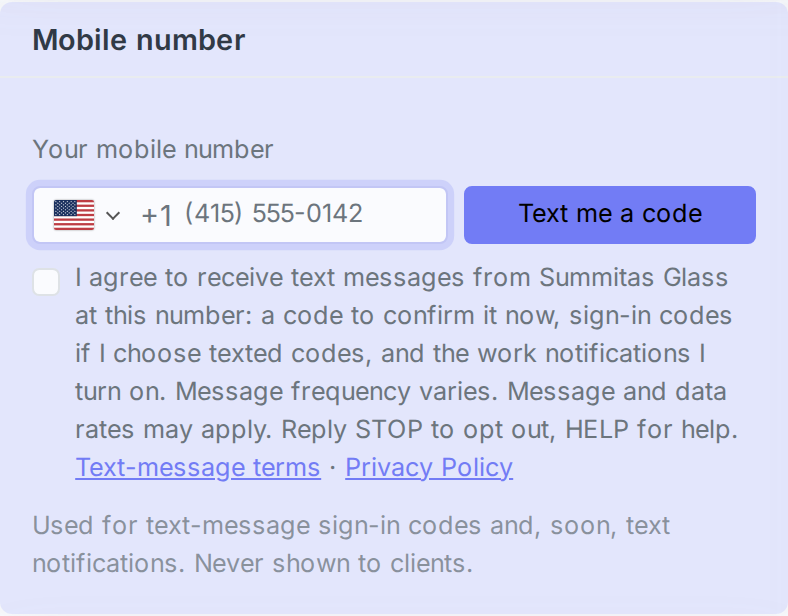
Opt-in happens in one place: the Mobile number card on the user's own Profile & Security page inside Glass, reached after signing in with a work email, password, and (where the firm requires it) a second factor. The person types their mobile number, ticks the consent box below, and presses Text me a code. Glass texts a one-time code to that number, and the number is used for nothing until the code is entered back. Texts beyond the confirmation code are off until the person turns them on.
☐ I agree to receive text messages from Summitas Glass at this number: a code to confirm it now, sign-in codes if I choose texted codes, and the work notifications I turn on. Message frequency varies. Message and data rates may apply. Reply STOP to opt out, HELP for help. Text-message terms · Privacy Policy
What is sent
- A confirmation code when a number is added: "Your Summitas Glass code is 482913. It expires in 10 minutes."
- Sign-in codes, only if the person chooses text messages as their second factor: "Your Summitas Glass sign-in code is 174205. It expires in 10 minutes."
- Work notifications, only the kinds the person switches on (for example a task assigned to them, a family's portal request, a document signed): "Glass: Maria Chen assigned you a task: Call the Hendersons about the rollover. Reply STOP to opt out."
Message frequency varies with the person's own settings: typically a few messages a week, none at all for someone who keeps notifications off. Message and data rates may apply.
How to stop
- Reply STOP to any message. No further texts are sent to that number.
- Reply HELP for help, or email support@summitas.com.
- Remove the number, or turn text notifications off, on Profile & Security inside Glass.
Privacy
Mobile numbers and text-message consent are never shared with third parties or affiliates for marketing or promotional purposes, and are passed only to the messaging provider that delivers the texts on our behalf. The full policy is at https://glass.sp-summitas.com/privacy; the terms of use at https://glass.sp-summitas.com/terms.